| | --- |
| | license: apache-2.0 |
| | language: |
| | - en |
| | - zh |
| | pipeline_tag: text-to-video |
| | library_name: diffusers |
| | tags: |
| | - video |
| | - video-generation |
| | --- |
| | |
| |
|
| | # Wan-Fun |
| |
|
| | 😊 Welcome! |
| |
|
| | [](https://huggingface.co/spaces/alibaba-pai/Wan2.1-Fun-1.3B-InP) |
| |
|
| | [](https://github.com/aigc-apps/VideoX-Fun) |
| |
|
| | [English](./README_en.md) | [简体中文](./README.md) |
| |
|
| | # Table of Contents |
| | - [Table of Contents](#table-of-contents) |
| | - [Model zoo](#model-zoo) |
| | - [Video Result](#video-result) |
| | - [Quick Start](#quick-start) |
| | - [How to use](#how-to-use) |
| | - [Reference](#reference) |
| | - [License](#license) |
| |
|
| | # Model zoo |
| |
|
| | | Name | Storage Size | Hugging Face | Model Scope | Description | |
| | |--|--|--|--|--| |
| | | Wan2.2-Fun-A14B-InP | 64.0 GB | [🤗Link](https://huggingface.co/alibaba-pai/Wan2.2-Fun-A14B-InP) | [😄Link](https://modelscope.cn/models/PAI/Wan2.2-Fun-A14B-InP) | Wan2.2-Fun-14B text-to-video generation weights, trained at multiple resolutions, supports start-end image prediction. | |
| | | Wan2.2-Fun-A14B-Control | 64.0 GB | [🤗Link](https://huggingface.co/alibaba-pai/Wan2.2-Fun-A14B-Control) | [😄Link](https://modelscope.cn/models/PAI/Wan2.2-Fun-A14B-Control)| Wan2.2-Fun-14B video control weights, supporting various control conditions such as Canny, Depth, Pose, MLSD, etc., and trajectory control. Supports multi-resolution (512, 768, 1024) video prediction at 81 frames, trained at 16 frames per second, with multilingual prediction support. | |
| | | Wan2.2-Fun-A14B-Control-Camera | 64.0 GB | [🤗Link](https://huggingface.co/alibaba-pai/Wan2.2-Fun-A14B-Control-Camera) | [😄Link](https://modelscope.cn/models/PAI/Wan2.2-Fun-A14B-Control-Camera)| Wan2.2-Fun-14B camera lens control weights. Supports multi-resolution (512, 768, 1024) video prediction, trained with 81 frames at 16 FPS, supports multilingual prediction. | |
| | | Wan2.2-Fun-5B-InP | 23.0 GB | [🤗Link](https://huggingface.co/alibaba-pai/Wan2.2-Fun-5B-InP) | [😄Link](https://modelscope.cn/models/PAI/Wan2.2-Fun-5B-InP) | Wan2.2-Fun-5B text-to-video weights trained at 121 frames, 24 FPS, supporting first/last frame prediction. | |
| | | Wan2.2-Fun-5B-Control | 23.0 GB | [🤗Link](https://huggingface.co/alibaba-pai/Wan2.2-Fun-5B-Control) | [😄Link](https://modelscope.cn/models/PAI/Wan2.2-Fun-5B-Control)| Wan2.2-Fun-5B video control weights, supporting control conditions like Canny, Depth, Pose, MLSD, and trajectory control. Trained at 121 frames, 24 FPS, with multilingual prediction support. | |
| | | Wan2.2-Fun-5B-Control-Camera | 23.0 GB | [🤗Link](https://huggingface.co/alibaba-pai/Wan2.2-Fun-5B-Control-Camera) | [😄Link](https://modelscope.cn/models/PAI/Wan2.2-Fun-5B-Control-Camera)| Wan2.2-Fun-5B camera lens control weights. Trained at 121 frames, 24 FPS, with multilingual prediction support. | |
| |
|
| | # Video Result |
| |
|
| | ### Wan2.2-Fun-A14B-InP |
| |
|
| | <table border="0" style="width: 100%; text-align: left; margin-top: 20px;"> |
| | <tr> |
| | <td> |
| | <video src="https://pai-aigc-photog.oss-cn-hangzhou.aliyuncs.com/wan_fun/asset_Wan2_2/v1.0/inp_1.mp4" width="100%" controls autoplay loop></video> |
| | </td> |
| | <td> |
| | <video src="https://pai-aigc-photog.oss-cn-hangzhou.aliyuncs.com/wan_fun/asset_Wan2_2/v1.0/inp_2.mp4" width="100%" controls autoplay loop></video> |
| | </td> |
| | <td> |
| | <video src="https://pai-aigc-photog.oss-cn-hangzhou.aliyuncs.com/wan_fun/asset_Wan2_2/v1.0/inp_3.mp4" width="100%" controls autoplay loop></video> |
| | </td> |
| | <td> |
| | <video src="https://pai-aigc-photog.oss-cn-hangzhou.aliyuncs.com/wan_fun/asset_Wan2_2/v1.0/inp_4.mp4" width="100%" controls autoplay loop></video> |
| | </td> |
| | </tr> |
| | </table> |
| | |
| | <table border="0" style="width: 100%; text-align: left; margin-top: 20px;"> |
| | <tr> |
| | <td> |
| | <video src="https://pai-aigc-photog.oss-cn-hangzhou.aliyuncs.com/wan_fun/asset_Wan2_2/v1.0/inp_5.mp4" width="100%" controls autoplay loop></video> |
| | </td> |
| | <td> |
| | <video src="https://pai-aigc-photog.oss-cn-hangzhou.aliyuncs.com/wan_fun/asset_Wan2_2/v1.0/inp_6.mp4" width="100%" controls autoplay loop></video> |
| | </td> |
| | <td> |
| | <video src="https://pai-aigc-photog.oss-cn-hangzhou.aliyuncs.com/wan_fun/asset_Wan2_2/v1.0/inp_7.mp4" width="100%" controls autoplay loop></video> |
| | </td> |
| | <td> |
| | <video src="https://pai-aigc-photog.oss-cn-hangzhou.aliyuncs.com/wan_fun/asset_Wan2_2/v1.0/inp_8.mp4" width="100%" controls autoplay loop></video> |
| | </td> |
| | </tr> |
| | </table> |
| | |
| | ### Wan2.2-Fun-A14B-Control |
| |
|
| | Generic Control Video + Reference Image: |
| | <table border="0" style="width: 100%; text-align: left; margin-top: 20px;"> |
| | <tr> |
| | <td> |
| | Reference Image |
| | </td> |
| | <td> |
| | Control Video |
| | </td> |
| | <td> |
| | Wan2.2-Fun-14B-Control |
| | </td> |
| | <tr> |
| | <td> |
| | <image src="https://pai-aigc-photog.oss-cn-hangzhou.aliyuncs.com/wan_fun/asset_Wan2_2/v1.0/8.png" width="100%" controls autoplay loop></image> |
| | </td> |
| | <td> |
| | <video src="https://pai-aigc-photog.oss-cn-hangzhou.aliyuncs.com/wan_fun/asset_Wan2_2/v1.0/pose.mp4" width="100%" controls autoplay loop></video> |
| | </td> |
| | <td> |
| | <video src="https://pai-aigc-photog.oss-cn-hangzhou.aliyuncs.com/wan_fun/asset_Wan2_2/v1.0/14b_ref.mp4" width="100%" controls autoplay loop></video> |
| | </td> |
| | <tr> |
| | </table> |
| | |
| | Generic Control Video (Canny, Pose, Depth, etc.) and Trajectory Control: |
| | <table border="0" style="width: 100%; text-align: left; margin-top: 20px;"> |
| | <tr> |
| | <td> |
| | <video src="https://pai-aigc-photog.oss-cn-hangzhou.aliyuncs.com/wan_fun/asset_Wan2_2/v1.0/guiji.mp4" width="100%" controls autoplay loop></video> |
| | </td> |
| | <td> |
| | <video src="https://pai-aigc-photog.oss-cn-hangzhou.aliyuncs.com/wan_fun/asset_Wan2_2/v1.0/guiji_out.mp4" width="100%" controls autoplay loop></video> |
| | </td> |
| | <tr> |
| | </table> |
| | |
| | <table border="0" style="width: 100%; text-align: left; margin-top: 20px;"> |
| | <tr> |
| | <td> |
| | <video src="https://pai-aigc-photog.oss-cn-hangzhou.aliyuncs.com/wan_fun/asset_Wan2_2/v1.0/pose.mp4" width="100%" controls autoplay loop></video> |
| | </td> |
| | <td> |
| | <video src="https://pai-aigc-photog.oss-cn-hangzhou.aliyuncs.com/wan_fun/asset_Wan2_2/v1.0/canny.mp4" width="100%" controls autoplay loop></video> |
| | </td> |
| | <td> |
| | <video src="https://pai-aigc-photog.oss-cn-hangzhou.aliyuncs.com/wan_fun/asset_Wan2_2/v1.0/depth.mp4" width="100%" controls autoplay loop></video> |
| | </td> |
| | <tr> |
| | <td> |
| | <video src="https://pai-aigc-photog.oss-cn-hangzhou.aliyuncs.com/wan_fun/asset_Wan2_2/v1.0/pose_out.mp4" width="100%" controls autoplay loop></video> |
| | </td> |
| | <td> |
| | <video src="https://pai-aigc-photog.oss-cn-hangzhou.aliyuncs.com/wan_fun/asset_Wan2_2/v1.0/canny_out.mp4" width="100%" controls autoplay loop></video> |
| | </td> |
| | <td> |
| | <video src="https://pai-aigc-photog.oss-cn-hangzhou.aliyuncs.com/wan_fun/asset_Wan2_2/v1.0/depth_out.mp4" width="100%" controls autoplay loop></video> |
| | </td> |
| | </tr> |
| | </table> |
| | |
| | ### Wan2.2-Fun-A14B-Control-Camera |
| |
|
| | <table border="0" style="width: 100%; text-align: left; margin-top: 20px;"> |
| | <tr> |
| | <td> |
| | Pan Up |
| | </td> |
| | <td> |
| | Pan Left |
| | </td> |
| | <td> |
| | Pan Right |
| | </td> |
| | <td> |
| | Zoom In |
| | </td> |
| | <tr> |
| | <td> |
| | <video src="https://pai-aigc-photog.oss-cn-hangzhou.aliyuncs.com/wan_fun/asset_Wan2_2/v1.0/Pan_Up.mp4" width="100%" controls autoplay loop></video> |
| | </td> |
| | <td> |
| | <video src="https://pai-aigc-photog.oss-cn-hangzhou.aliyuncs.com/wan_fun/asset_Wan2_2/v1.0/Pan_Left.mp4" width="100%" controls autoplay loop></video> |
| | </td> |
| | <td> |
| | <video src="https://pai-aigc-photog.oss-cn-hangzhou.aliyuncs.com/wan_fun/asset_Wan2_2/v1.0/Pan_Right.mp4" width="100%" controls autoplay loop></video> |
| | </td> |
| | <td> |
| | <video src="https://pai-aigc-photog.oss-cn-hangzhou.aliyuncs.com/wan_fun/asset_Wan2_2/v1.0/Zoom_In.mp4" width="100%" controls autoplay loop></video> |
| | </td> |
| | <tr> |
| | <td> |
| | Pan Down |
| | </td> |
| | <td> |
| | Pan Up + Pan Left |
| | </td> |
| | <td> |
| | Pan Up + Pan Right |
| | </td> |
| | <td> |
| | Zoom Out |
| | </td> |
| | <tr> |
| | <td> |
| | <video src="https://pai-aigc-photog.oss-cn-hangzhou.aliyuncs.com/wan_fun/asset_Wan2_2/v1.0/Pan_Down.mp4" width="100%" controls autoplay loop></video> |
| | </td> |
| | <td> |
| | <video src="https://pai-aigc-photog.oss-cn-hangzhou.aliyuncs.com/wan_fun/asset_Wan2_2/v1.0/Pan_UL.mp4" width="100%" controls autoplay loop></video> |
| | </td> |
| | <td> |
| | <video src="https://pai-aigc-photog.oss-cn-hangzhou.aliyuncs.com/wan_fun/asset_Wan2_2/v1.0/Pan_UR.mp4" width="100%" controls autoplay loop></video> |
| | </td> |
| | <td> |
| | <video src="https://pai-aigc-photog.oss-cn-hangzhou.aliyuncs.com/wan_fun/asset_Wan2_2/v1.0/Zoom_Out.mp4" width="100%" controls autoplay loop></video> |
| | </td> |
| | </tr> |
| | </table> |
| | |
| | # Quick Start |
| | ### 1. Cloud usage: AliyunDSW/Docker |
| | #### a. From AliyunDSW |
| | DSW has free GPU time, which can be applied once by a user and is valid for 3 months after applying. |
| |
|
| | Aliyun provide free GPU time in [Freetier](https://free.aliyun.com/?product=9602825&crowd=enterprise&spm=5176.28055625.J_5831864660.1.e939154aRgha4e&scm=20140722.M_9974135.P_110.MO_1806-ID_9974135-MID_9974135-CID_30683-ST_8512-V_1), get it and use in Aliyun PAI-DSW to start CogVideoX-Fun within 5min! |
| |
|
| | [](https://gallery.pai-ml.com/#/preview/deepLearning/cv/cogvideox_fun) |
| |
|
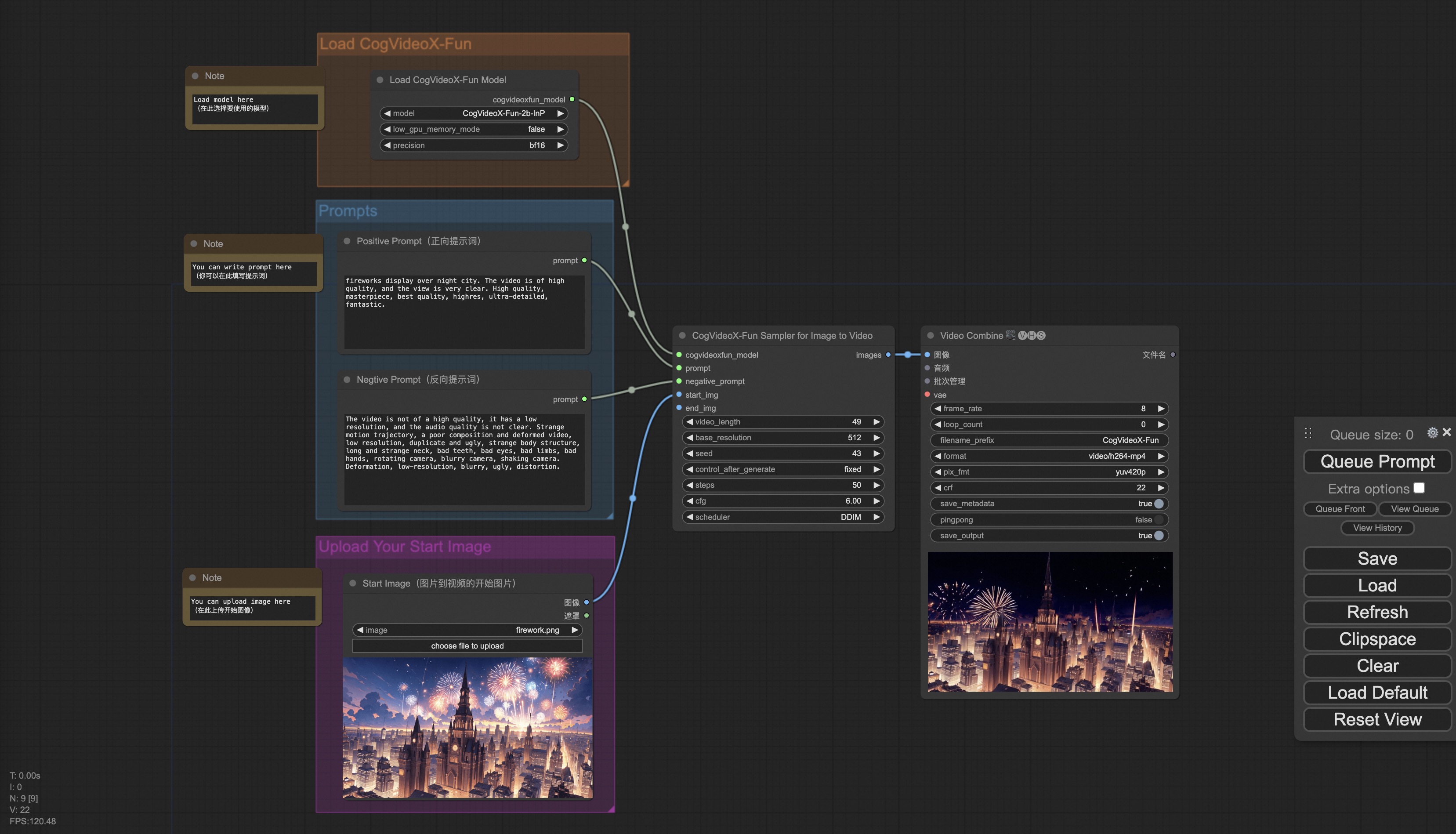
| | #### b. From ComfyUI |
| | Our ComfyUI is as follows, please refer to [ComfyUI README](comfyui/README.md) for details. |
| |  |
| |
|
| | #### c. From docker |
| | If you are using docker, please make sure that the graphics card driver and CUDA environment have been installed correctly in your machine. |
| |
|
| | Then execute the following commands in this way: |
| | ``` |
| | # pull image |
| | docker pull mybigpai-public-registry.cn-beijing.cr.aliyuncs.com/easycv/torch_cuda:cogvideox_fun |
| | |
| | # enter image |
| | docker run -it -p 7860:7860 --network host --gpus all --security-opt seccomp:unconfined --shm-size 200g mybigpai-public-registry.cn-beijing.cr.aliyuncs.com/easycv/torch_cuda:cogvideox_fun |
| | |
| | # clone code |
| | git clone https://github.com/aigc-apps/VideoX-Fun.git |
| | |
| | # enter VideoX-Fun's dir |
| | cd VideoX-Fun |
| | |
| | # download weights |
| | mkdir models/Diffusion_Transformer |
| | mkdir models/Personalized_Model |
| | |
| | # Please use the hugginface link or modelscope link to download the model. |
| | # CogVideoX-Fun |
| | # https://huggingface.co/alibaba-pai/CogVideoX-Fun-V1.1-5b-InP |
| | # https://modelscope.cn/models/PAI/CogVideoX-Fun-V1.1-5b-InP |
| | |
| | # Wan |
| | # https://huggingface.co/alibaba-pai/Wan2.1-Fun-V1.1-14B-InP |
| | # https://modelscope.cn/models/PAI/Wan2.1-Fun-V1.1-14B-InP |
| | # https://huggingface.co/alibaba-pai/Wan2.2-Fun-A14B-InP |
| | # https://modelscope.cn/models/PAI/Wan2.2-Fun-A14B-InP |
| | ``` |
| |
|
| | ### 2. Local install: Environment Check/Downloading/Installation |
| | #### a. Environment Check |
| | We have verified this repo execution on the following environment: |
| |
|
| | The detailed of Windows: |
| | - OS: Windows 10 |
| | - python: python3.10 & python3.11 |
| | - pytorch: torch2.2.0 |
| | - CUDA: 11.8 & 12.1 |
| | - CUDNN: 8+ |
| | - GPU: Nvidia-3060 12G & Nvidia-3090 24G |
| |
|
| | The detailed of Linux: |
| | - OS: Ubuntu 20.04, CentOS |
| | - python: python3.10 & python3.11 |
| | - pytorch: torch2.2.0 |
| | - CUDA: 11.8 & 12.1 |
| | - CUDNN: 8+ |
| | - GPU:Nvidia-V100 16G & Nvidia-A10 24G & Nvidia-A100 40G & Nvidia-A100 80G |
| |
|
| | We need about 60GB available on disk (for saving weights), please check! |
| |
|
| | #### b. Weights |
| | We'd better place the [weights](#model-zoo) along the specified path: |
| |
|
| | **Via ComfyUI**: |
| | Put the models into the ComfyUI weights folder `ComfyUI/models/Fun_Models/`: |
| | ``` |
| | 📦 ComfyUI/ |
| | ├── 📂 models/ |
| | │ └── 📂 Fun_Models/ |
| | │ ├── 📂 CogVideoX-Fun-V1.1-2b-InP/ |
| | │ ├── 📂 CogVideoX-Fun-V1.1-5b-InP/ |
| | │ ├── 📂 Wan2.1-Fun-14B-InP |
| | │ └── 📂 Wan2.1-Fun-1.3B-InP/ |
| | ``` |
| |
|
| | **Run its own python file or UI interface**: |
| | ``` |
| | 📦 models/ |
| | ├── 📂 Diffusion_Transformer/ |
| | │ ├── 📂 CogVideoX-Fun-V1.1-2b-InP/ |
| | │ ├── 📂 CogVideoX-Fun-V1.1-5b-InP/ |
| | │ ├── 📂 Wan2.1-Fun-14B-InP |
| | │ └── 📂 Wan2.1-Fun-1.3B-InP/ |
| | ├── 📂 Personalized_Model/ |
| | │ └── your trained trainformer model / your trained lora model (for UI load) |
| | ``` |
| |
|
| | # How to Use |
| |
|
| | <h3 id="video-gen">1. Generation</h3> |
| |
|
| | #### a. GPU Memory Optimization |
| | Since Wan2.1 has a very large number of parameters, we need to consider memory optimization strategies to adapt to consumer-grade GPUs. We provide `GPU_memory_mode` for each prediction file, allowing you to choose between `model_cpu_offload`, `model_cpu_offload_and_qfloat8`, and `sequential_cpu_offload`. This solution is also applicable to CogVideoX-Fun generation. |
| |
|
| | - `model_cpu_offload`: The entire model is moved to the CPU after use, saving some GPU memory. |
| | - `model_cpu_offload_and_qfloat8`: The entire model is moved to the CPU after use, and the transformer model is quantized to float8, saving more GPU memory. |
| | - `sequential_cpu_offload`: Each layer of the model is moved to the CPU after use. It is slower but saves a significant amount of GPU memory. |
| |
|
| | `qfloat8` may slightly reduce model performance but saves more GPU memory. If you have sufficient GPU memory, it is recommended to use `model_cpu_offload`. |
| |
|
| | #### b. Using ComfyUI |
| | For details, refer to [ComfyUI README](https://github.com/aigc-apps/VideoX-Fun/tree/main/comfyui)。 |
| |
|
| | #### c. Running Python Files |
| | - **Step 1**: Download the corresponding [weights](#model-zoo) and place them in the `models` folder. |
| | - **Step 2**: Use different files for prediction based on the weights and prediction goals. This library currently supports CogVideoX-Fun, Wan2.1, Wan2.1-Fun and Wan2.2. Different models are distinguished by folder names under the `examples` folder, and their supported features vary. Use them accordingly. Below is an example using CogVideoX-Fun: |
| | - **Text-to-Video**: |
| | - Modify `prompt`, `neg_prompt`, `guidance_scale`, and `seed` in the file `examples/cogvideox_fun/predict_t2v.py`. |
| | - Run the file `examples/cogvideox_fun/predict_t2v.py` and wait for the results. The generated videos will be saved in the folder `samples/cogvideox-fun-videos`. |
| | - **Image-to-Video**: |
| | - Modify `validation_image_start`, `validation_image_end`, `prompt`, `neg_prompt`, `guidance_scale`, and `seed` in the file `examples/cogvideox_fun/predict_i2v.py`. |
| | - `validation_image_start` is the starting image of the video, and `validation_image_end` is the ending image of the video. |
| | - Run the file `examples/cogvideox_fun/predict_i2v.py` and wait for the results. The generated videos will be saved in the folder `samples/cogvideox-fun-videos_i2v`. |
| | - **Video-to-Video**: |
| | - Modify `validation_video`, `validation_image_end`, `prompt`, `neg_prompt`, `guidance_scale`, and `seed` in the file `examples/cogvideox_fun/predict_v2v.py`. |
| | - `validation_video` is the reference video for video-to-video generation. You can use the following demo video: [Demo Video](https://pai-aigc-photog.oss-cn-hangzhou.aliyuncs.com/cogvideox_fun/asset/v1/play_guitar.mp4). |
| | - Run the file `examples/cogvideox_fun/predict_v2v.py` and wait for the results. The generated videos will be saved in the folder `samples/cogvideox-fun-videos_v2v`. |
| | - **Controlled Video Generation (Canny, Pose, Depth, etc.)**: |
| | - Modify `control_video`, `validation_image_end`, `prompt`, `neg_prompt`, `guidance_scale`, and `seed` in the file `examples/cogvideox_fun/predict_v2v_control.py`. |
| | - `control_video` is the control video extracted using operators such as Canny, Pose, or Depth. You can use the following demo video: [Demo Video](https://pai-aigc-photog.oss-cn-hangzhou.aliyuncs.com/cogvideox_fun/asset/v1.1/pose.mp4). |
| | - Run the file `examples/cogvideox_fun/predict_v2v_control.py` and wait for the results. The generated videos will be saved in the folder `samples/cogvideox-fun-videos_v2v_control`. |
| | - **Step 3**: If you want to integrate other backbones or Loras trained by yourself, modify `lora_path` and relevant paths in `examples/{model_name}/predict_t2v.py` or `examples/{model_name}/predict_i2v.py` as needed. |
| |
|
| | #### d. Using the Web UI |
| | The web UI supports text-to-video, image-to-video, video-to-video, and controlled video generation (Canny, Pose, Depth, etc.). This library currently supports CogVideoX-Fun, Wan2.1, and Wan2.1-Fun. Different models are distinguished by folder names under the `examples` folder, and their supported features vary. Use them accordingly. Below is an example using CogVideoX-Fun: |
| |
|
| | - **Step 1**: Download the corresponding [weights](#model-zoo) and place them in the `models` folder. |
| | - **Step 2**: Run the file `examples/cogvideox_fun/app.py` to access the Gradio interface. |
| | - **Step 3**: Select the generation model on the page, fill in `prompt`, `neg_prompt`, `guidance_scale`, and `seed`, click "Generate," and wait for the results. The generated videos will be saved in the `sample` folder. |
| |
|
| | # Reference |
| | - CogVideo: https://github.com/THUDM/CogVideo/ |
| | - EasyAnimate: https://github.com/aigc-apps/EasyAnimate |
| | - Wan2.1: https://github.com/Wan-Video/Wan2.1/ |
| | - Wan2.1: https://github.com/Wan-Video/Wan2.2/ |
| | - ComfyUI-KJNodes: https://github.com/kijai/ComfyUI-KJNodes |
| | - ComfyUI-EasyAnimateWrapper: https://github.com/kijai/ComfyUI-EasyAnimateWrapper |
| | - ComfyUI-CameraCtrl-Wrapper: https://github.com/chaojie/ComfyUI-CameraCtrl-Wrapper |
| | - CameraCtrl: https://github.com/hehao13/CameraCtrl |
| |
|
| | # License |
| | This project is licensed under the [Apache License (Version 2.0)](https://github.com/modelscope/modelscope/blob/master/LICENSE). |

